


Greenlane - Fuel Smarter
4.4218.00 Reviews
App Specs
- Version
- 1.0.112
- Updated On
- License
- Free
- Downloads
- 10,000+
- Developer
- Greenlane.ai
- Categories
- Maps & Navigation
- Platform
- Android
Screenshots
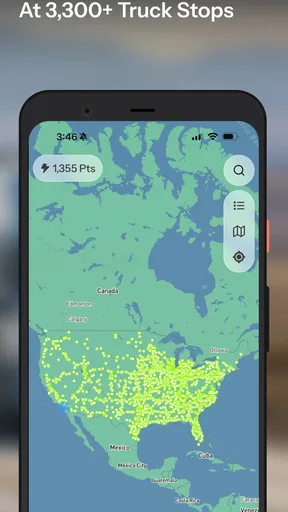
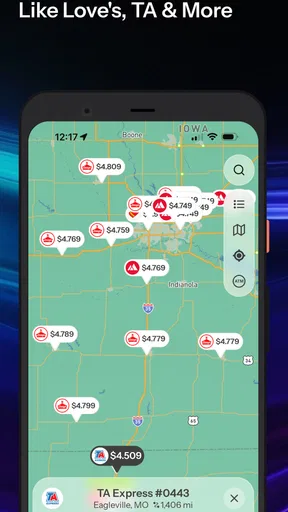
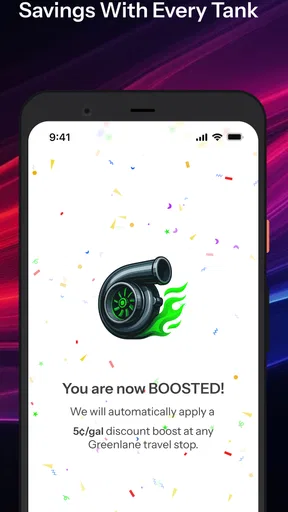
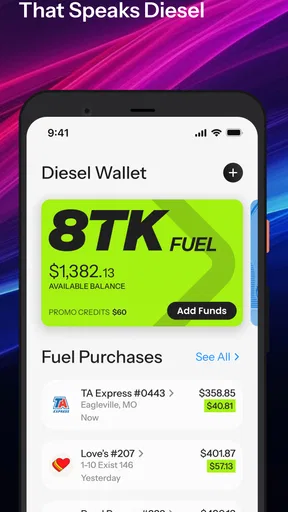
 Analysis by AppCompare
Long-haul driving turns fuel planning into a constant balancing act. The cheapest stop is not always close enough, and the most convenient stop may quietly make a trip more expensive. I tried Greenlane - Fuel Smarter as a focused companion for that problem, and I found an app that makes the search for truck-stop fuel discounts much more practical than relying on a general map alone.
It is a free Maps & Navigation app from Greenlane.ai, aimed especially at people who drive trucks or regularly plan routes around truck stops. The basic appeal is straightforward: it brings discounted diesel information into the route-planning conversation instead of leaving fuel costs as something to check separately. That sounds simple, but the difference matters when a small detour, a crowded stop, or an outdated price can affect the whole day.
My overall impression is positive, with one important qualification: this is best treated as a fuel-saving tool within a larger driving workflow, not as a complete replacement for a full navigation app. If you want help identifying worthwhile truck-stop options, it has a clear purpose. If you expect turn-by-turn navigation, broad travel planning, or a universal solution for every kind of driver, its narrower design may feel limiting.
From an expensive fuel stop to a smarter shortlist
The most useful way to understand the app is to follow a realistic situation. Imagine starting a long driving shift with a planned route, a partly filled tank, and a rough idea of where the next break should happen. The usual approach is to open a general map, search for truck stops, compare whatever fuel information appears, and then make a decision while watching the clock. That process often produces a list of places, but not necessarily a confident answer about where the diesel purchase makes the most sense.
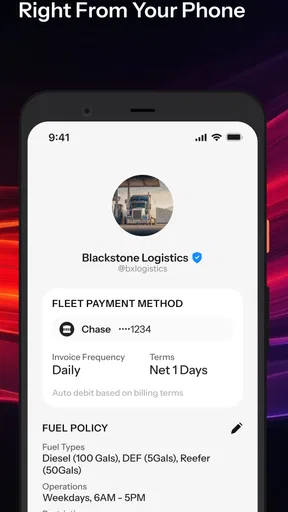
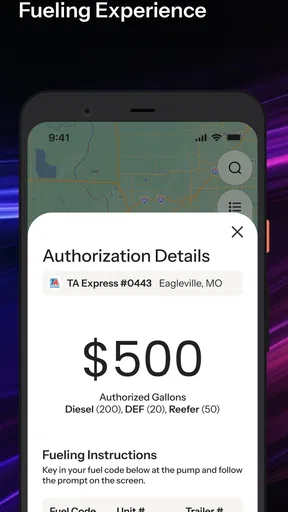
Greenlane changes the starting point. Instead of asking only which fuel station is nearby, I can begin with the question that matters more to a working driver: which truck-stop option can reduce the cost of the fuel I already need to buy? The service focuses on deep diesel discounts across more than three thousand truck stops, so its value is tied to comparison rather than simple discovery.
That distinction is important. A general maps app is excellent at showing what is close, checking opening information, and building a route. It is not always designed around the economics of diesel stops. Greenlane feels more specialized because the fuel decision comes first. I can use it to narrow the field, then use my normal navigation tool to handle the actual journey.
For a private car driver making an occasional fill-up, that extra focus may not justify adding another app. For someone who drives a heavy vehicle, travels predictable corridors, or pays close attention to fuel spend, the specialization makes more sense. The app is not trying to be everything; its usefulness comes from concentrating on one expensive and recurring part of the trip.
Worth Reading Before You Choose

EA SPORTS FC Mobile 26 Is a Bigger Football Game, but It Takes Time

Flipboard Shows What News Apps Must Do Beyond the Feed

Switching to Android Auto Means Rethinking Your Driving Routine

Google Calendar Makes a Crowded Week Easier to Manage

Ludo King Makes the Most of the Minutes Between Plans

Baby Panda World Brings Quick Play to Modern Phones, but Its Game Library Feels Busy
The first decision: search for savings or search for convenience
Before opening the app, I would decide what kind of stop I am actually willing to use. The lowest discounted diesel option is not automatically the right choice if it requires an awkward detour, falls outside the driving plan, or does not fit the timing of the break. Greenlane can improve the comparison, but it cannot remove the practical trade-off between price and route efficiency.
This is one of the first non-obvious lessons from using a specialized fuel app: a discount should be evaluated against the whole stop, not viewed in isolation. I would compare the candidate stop with the route I already intend to drive, the remaining fuel, and the next realistic opportunity to stop. A slightly less attractive discount may be the better decision if it avoids backtracking or keeps the day on schedule.
That workflow also prevents a common mistake. Seeing a strong saving can encourage a driver to change plans too quickly. I found it more useful to treat the app as a shortlist generator. It tells me where to investigate, while the final choice still depends on distance, access, traffic, and the needs of the vehicle.
Moving from discovery to a usable route
Once I have identified a promising truck stop, the next step is a handoff. Greenlane handles the fuel-saving part of the decision; a navigation app or the vehicle’s own route system handles directions. That division is not a weakness by itself. In fact, it can be clearer than forcing one app to perform several jobs poorly.
The handoff does create friction, though. I need to make sure I have selected the correct location before switching tools, especially when several stops have similar names or sit close to one another. A careful driver should check the destination details and confirm that the route is suitable for a truck rather than assuming that the shortest road shown by a consumer navigation service is automatically appropriate.
I also prefer making the fuel decision before the vehicle is close to empty. That leaves room to reject an inconvenient stop and compare another option. Using Greenlane at the last possible moment reduces its advantage because urgency pushes the decision back toward the nearest available station. The app works best when it is part of preparation, not a rescue tool during a rushed final stretch.
What the workflow feels like during an ordinary driving day
Here is the everyday scenario I would recommend to a friend. Before leaving, I check the route and decide roughly when a fuel stop will be needed. I open Greenlane to investigate truck-stop diesel discounts along the likely path, identify the options that appear worthwhile, and then verify the chosen destination in my usual navigation setup. During the drive, I keep the plan flexible enough to account for traffic, rest timing, and the actual fuel level.
That sequence gives each tool a clear role. Greenlane supports the financial decision. The navigation system supports movement. My own judgement connects the two. The result is less random than pulling into the first familiar station, but it does not pretend that a displayed saving is the only factor that matters.
A useful advanced habit is to compare the stop you want with the stop you would naturally use anyway. If Greenlane points to a discounted location that lies close to the planned path, the choice is easy. If it points somewhere far away, I would ask whether the saving is meaningful after considering extra distance, time, and fuel consumed to reach it. This turns the app from a “find the lowest number” tool into a “find the sensible total cost” tool.
Where the handoffs need human attention
The app’s workflow involves several handoffs: from the driver’s plan to the search, from the search result to navigation, and from the planned stop to the physical entrance. Each handoff is a potential point of error. A location that looks ideal on a screen may still be inconvenient for a large vehicle, difficult to enter from the current direction, or poorly timed for the rest of the route.
I would also avoid treating any fuel information as a promise that the final purchase will match the expectation. Prices and discount conditions can change, and the practical value of an option depends on what is available when the driver arrives. Greenlane is most useful as decision support. It improves the information used to make a choice, but sensible users should still verify the situation at the stop.
This is where the app differs from a traditional navigation tool. Navigation apps generally answer “how do I get there?” Greenlane is more concerned with “which fuel stop deserves consideration?” Neither question replaces the other. The strongest setup is to use both, with the specialized app influencing the destination and the navigation app managing the journey.
What you get at the end of the process
The outcome is not just a pin on a map. The real result is a more deliberate fuel plan. Instead of stopping because a station happens to appear at the right moment, I can begin the trip with a reason for choosing one truck stop over another. That can make a long route feel more controlled, particularly when diesel costs are a major part of the operating budget.
Greenlane has earned a 4.3 average from around six hundred thirty ratings, and its audience has taken to the focused idea. The app has passed ten thousand installs, which gives it a modest but meaningful presence among drivers looking for this kind of specialized assistance. I would not interpret those figures as proof that it will fit every workflow, but they do suggest that the concept is reaching people who see value in dedicated fuel planning.
The free price is a major advantage for trying it. There is little commitment involved in adding it to a route-planning routine, and the Everyone content rating makes it broadly accessible from an age-classification perspective. I can test whether the information fits my driving habits without first making a purchase decision.
The current version is 1.0.112, and the app runs on Android nine or later. That makes compatibility worth checking before planning around it, particularly on an older work phone. A driver who uses a company-issued device should also confirm that the operating system meets the requirement before relying on the app during a trip.
Who will get the most from it
I think the strongest audience is made up of long-distance truck drivers, owner-operators, dispatchers who help plan fuel stops, and anyone whose regular travel involves diesel truck stops. It is especially useful for people who already use a separate navigation app and want a dedicated layer for comparing fuel opportunities.
It can also help a driver who repeatedly travels the same broad corridors. Familiar routes make it easier to judge whether a discount location is genuinely convenient, because the driver already understands typical traffic, stopping patterns, and difficult access points. In that situation, Greenlane can become a repeatable pre-trip check rather than something opened only when a tank is nearly empty.
I would be less enthusiastic about it for someone who rarely drives beyond local areas, fuels a small passenger car, or values having every function inside one navigation application. The extra app may feel unnecessary when fuel choices are plentiful and the savings decision is minor. Likewise, drivers who need detailed truck-routing safeguards, live road conditions, or comprehensive trip management should keep using a full navigation solution alongside it.
Three practical habits that make the app more useful
First, I would use it before the shift rather than while driving. A pre-trip review gives enough time to compare the attractive options with the actual route and avoids making a financial decision under pressure. It also makes the handoff to navigation cleaner because the destination is chosen in advance.
Second, I would keep a backup stop in mind. The best-looking discount is not always the best operational choice, and a driver may need to change plans because of traffic, queueing, access, or a change in fuel level. Having a second candidate means the app still supports the decision even when the first plan breaks.
Third, I would judge savings by the complete detour rather than by the discount alone. This is the most important trade-off. A low diesel price can lose its advantage if reaching it adds unnecessary distance or disrupts the route. Greenlane helps expose attractive options, but the driver still needs to calculate whether the stop fits the day.
A fourth habit is to separate information gathering from active driving. I would review the app while parked or before departure, then use the chosen destination in the navigation tool. That reduces distraction and respects the fact that a fuel-planning app is most valuable when it supports a decision made safely, not when it competes for attention on the road.
Where the flow breaks down
The biggest limitation is the app’s narrow role. It is built around discounted diesel at truck stops, not around the complete experience of getting from one place to another. If I want one application to search, route, monitor traffic, manage stops, and guide me turn by turn, Greenlane will not replace that broader tool.
The second limitation is that savings do not automatically equal convenience. A stop can look attractive in a list and still be a poor fit for the vehicle, the direction of travel, or the driver’s schedule. The app improves the starting information, but it cannot make every discounted location operationally suitable.
The third is the need for a reliable handoff. Moving from Greenlane to another navigation system adds a step, and every extra step can be annoying when a driver is tired or already behind schedule. I consider this manageable, but it is a genuine reason some people may prefer a more integrated alternative.
Finally, the app should not encourage overconfidence. Fuel conditions can change, and a planned stop may not work exactly as expected. I would keep enough flexibility in the route to make a different choice when circumstances change. The strongest result comes from combining Greenlane’s specialized comparison with ordinary route awareness, not from following a discount blindly.
My recommendation after using it
Greenlane - Fuel Smarter is a worthwhile addition for drivers who make frequent diesel purchases and want a more cost-conscious way to choose truck stops. Its free access, focused purpose, and emphasis on deep discounts make it easy to test, while its modest scope keeps expectations realistic.
I would recommend it to a friend who already has a preferred navigation app and wants help deciding where to fuel. I would explain that the best workflow is to search early, compare the candidate with the real route, pass the selected destination to navigation, and keep a backup plan. Used that way, the app can turn an automatic fuel stop into a more informed decision.
I would skip it if the goal is a complete navigation replacement or if fuel savings are not important enough to justify a separate planning step. For the right driver, though, that specialization is exactly the point. The app works best as a smart fuel-planning layer, not as the entire driving system.
Pros
- Helps compare nearby fuel prices before you stop to refuel.
- Can make regular driving expenses easier to monitor and manage.
- Useful for commuters who frequently travel through unfamiliar areas.
- Simple interface makes essential fuel information quick to find.
- May help identify cheaper stations along planned routes.
Cons
- Coverage and price accuracy may vary by country or local station data.
- Fuel prices can change before you arrive at the selected station.
- Some features may require location access while you use the app.
- Savings may be limited when nearby stations have similar prices.
- Requires mobile data or GPS for the best real-time experience.
FAQs for Greenlane - Fuel Smarter
What is Greenlane - Fuel Smarter and how does it work?
Greenlane - Fuel Smarter is designed to help drivers make more informed decisions about refueling. After opening the app, users can typically review nearby fuel options, compare available prices or estimated costs, and plan stops more efficiently. Its usefulness depends on the coverage and accuracy of local data, so it is best treated as a helpful planning tool rather than a guaranteed real-time source.
Can Greenlane - Fuel Smarter help me find cheaper fuel near my location?
The app is intended to make fuel shopping easier by helping users identify potentially more affordable stations in their area or along a planned route. Results may vary depending on location permissions, participating stations, network availability, and how recently prices were updated. Before driving to a station, it is sensible to confirm the displayed price because fuel costs can change quickly.
Does Greenlane - Fuel Smarter require location access or an internet connection?
Greenlane - Fuel Smarter may need location access to provide relevant nearby stations, route suggestions, or localized fuel information. An internet connection is also generally important for loading current listings and updating data. Users who disable location services or use the app with limited connectivity may see fewer results, outdated information, or reduced functionality compared with the normal online experience.
Is Greenlane - Fuel Smarter free to download and use?
The availability of free features, optional upgrades, advertisements, or subscription plans can depend on the current version of Greenlane - Fuel Smarter and the platform where it is installed. Before downloading, check the official Google Play Store or Apple App Store listing for pricing details, in-app purchase information, and any subscription terms. Store descriptions can change as the developer updates the app.
Is Greenlane - Fuel Smarter safe to use while driving?
The app should be used before starting a journey or by a passenger, not while the driver is actively operating the vehicle. Searching for stations, checking prices, or adjusting routes can distract you and may be unsafe or illegal in some locations. Plan your fuel stop in advance, follow local traffic laws, and only interact with the application when the vehicle is parked safely.


